The competitor leaderboard
The Competitors page (called Competitor Gap in-app) shows every brand AI assistants recommended in your scanned prompts, ranked by Mention Score. The top of the page summarises the set: total tracked competitors, total rival mentions, your share of voice, and how crowded the category looks.
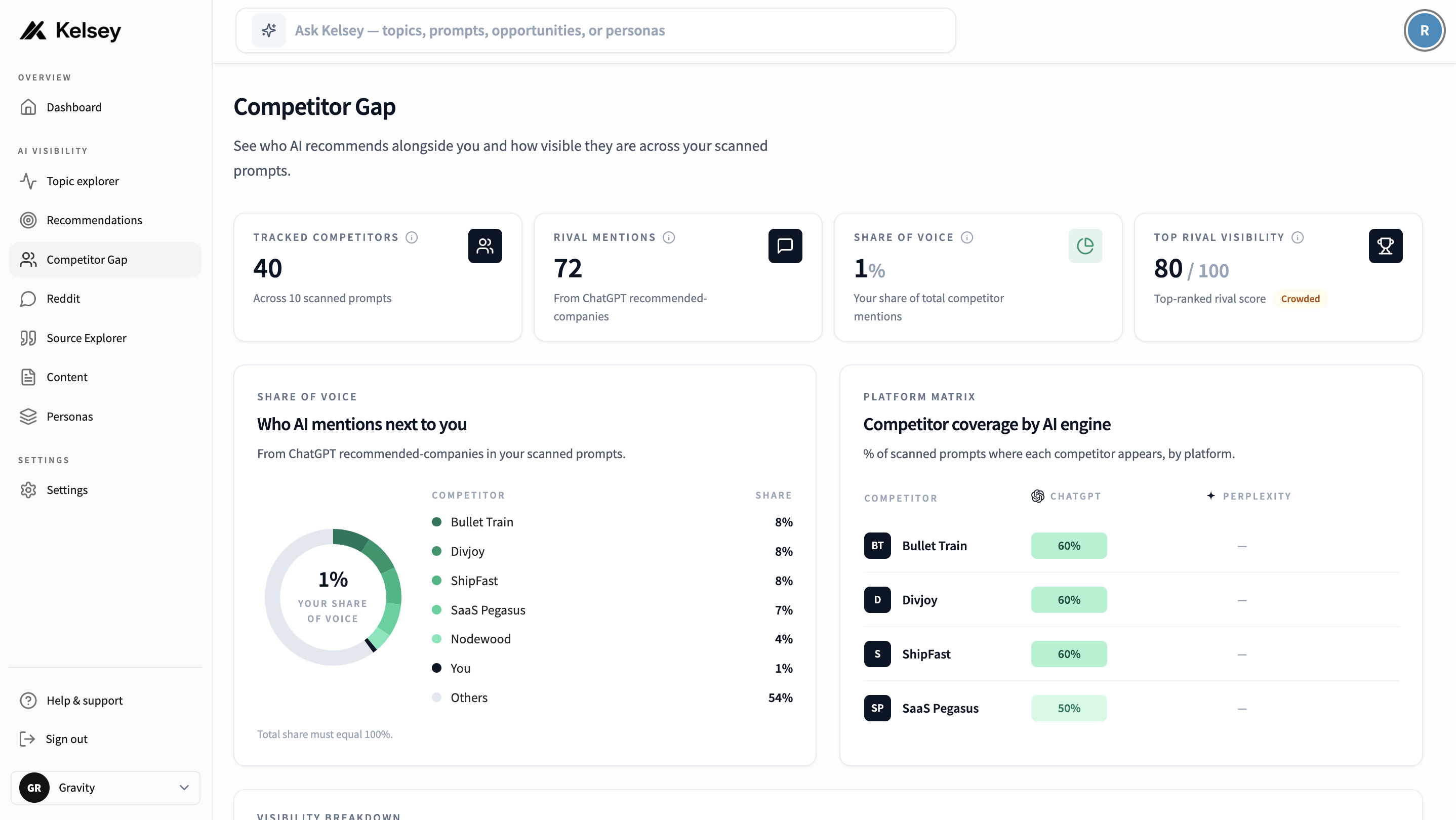
Each row shows:
- Mention Score: a 0 to 100 blend of how many of your prompts the brand appears in, plus how often it's mentioned overall.
- Mentions: total times the brand appeared in ChatGPT answer lists.
- Queries won: prompts where the brand was the first option ChatGPT named.
- ChatGPT %: share of your prompts where the brand showed up.
- Perplexity %: share of Perplexity-scanned prompts where one of the brand's domains appeared in citations.
Empty leaderboard?
If you see "No competitors in the data yet", run scans on more prompts. Kelsey can only surface competitors after the AI has actually answered your prompts.
How Kelsey discovers competitors
There is no "add competitor" button, and that's intentional. Manually-curated competitor lists tell you who you think competes with you. Kelsey shows you who AI thinks competes with you, which is what actually matters when buyers ask AI for recommendations.
Kelsey extracts competitors from two real signals:
- ChatGPT recommendations: every brand ChatGPT lists in its answer to one of your prompts gets added.
- Perplexity citations: domains Perplexity cites get matched against the brands Kelsey has already discovered, so a brand can also get credit for being the source AI quotes.
The set updates automatically every time you run a scan. Brands that stop showing up will fall down the leaderboard; new ones that start appearing will rise.
The full competitor table
Below the leaderboard summary, Kelsey renders the entire set as a sortable Visibility Breakdown table. Every brand AI assistants have surfaced in your scanned prompts gets a row, ranked by Mention Score from highest to lowest. Use this when you want to scan the whole field instead of just the top names.
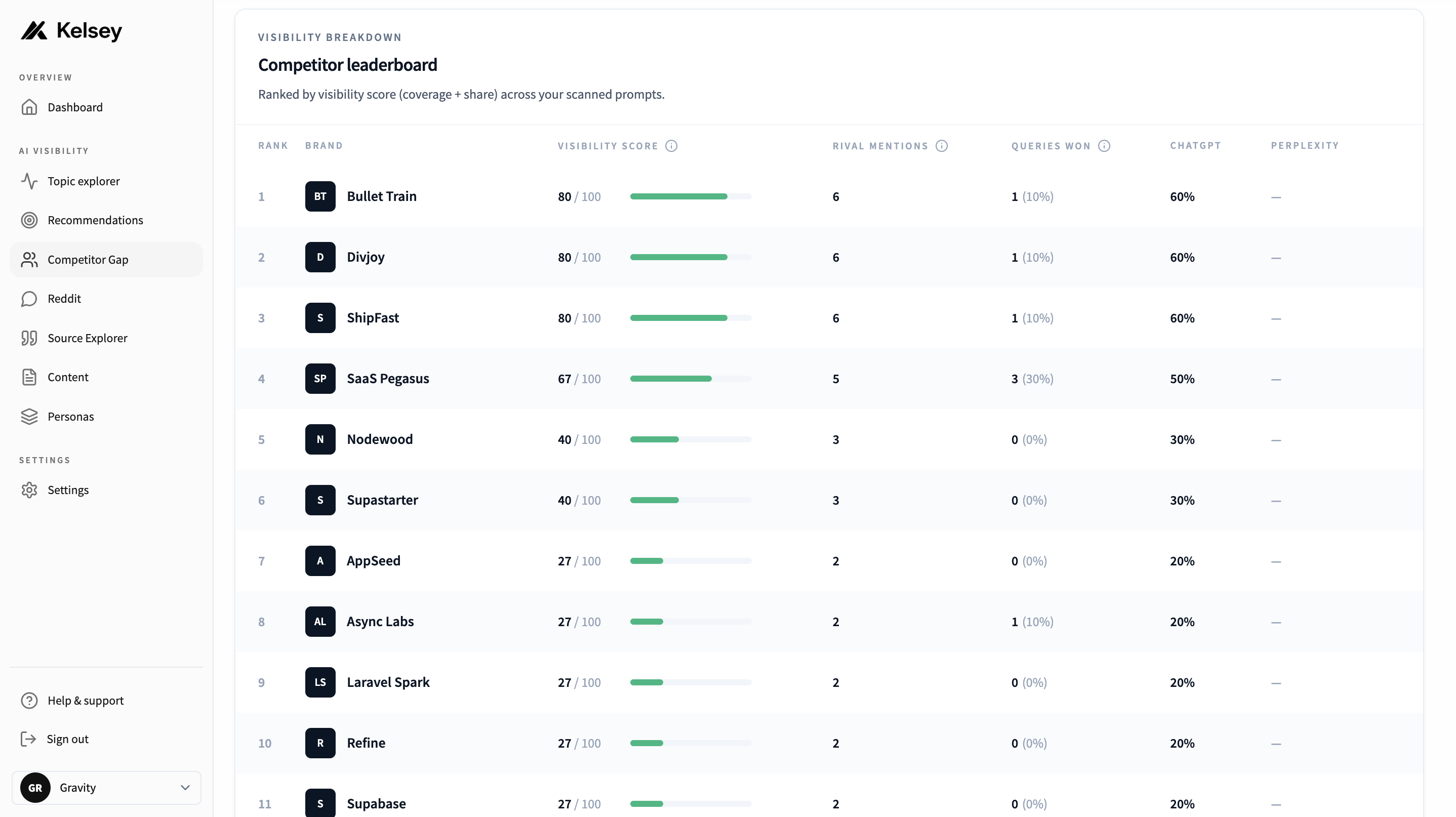
The columns:
- Rank: position in the leaderboard, sorted by Mention Score from highest to lowest.
- Brand: the competitor's name, with a small launch icon to open their website in a new tab.
- Mention Score: a 0 to 100 blend of coverage (how many of your prompts they appear in) and share (how often they're mentioned overall), with an inline progress bar.
- Rival Mentions: total times the brand appeared in ChatGPT answer lists across your scanned prompts.
- Queries Won: prompts where the brand was first in the ChatGPT recommendation list, with the percentage of your prompts shown in parentheses.
- ChatGPT: share of your prompts where the brand showed up in a ChatGPT answer.
- Perplexity: share of Perplexity-scanned prompts where one of the brand's domains appeared in citations. A dash here means Kelsey hasn't scanned the prompt with Perplexity yet, or doesn't have a known URL to match against citations.
The table scrolls horizontally on smaller screens so you can read every column.
Shaping your competitor set with prompts
Since the competitor set is derived from AI answers, your prompts are the only lever that controls who shows up. Vague or off-target prompts produce a vague or off-target competitor set.
If your leaderboard looks wrong:
- Too generic: your prompts are probably broad. Tighten them with the use-case, persona, or constraint your buyers actually care about ("for a small services agency", "without a sales call", "open-source").
- Missing key competitors: add prompts that name a category, ask for alternatives, or describe a job-to-be-done where those competitors typically appear.
- Full of irrelevant brands: your prompts may be too broad or in the wrong category. Re-read the actual AI answer on the query detail page; if the assistant misunderstood the prompt, rewrite it.
Run more scans across your prompt set and the leaderboard will sharpen. See Queries for prompt-writing guidance.